做项目时,因为想要显示下自己的一些日志,所以想用到android的弹窗。然而觉得系统自带的太丑了,所以说百度了一下怎么自定义一个自己的弹窗体,主要想要实现可以在弹窗内容中添加View组件的功能。这里源码是参考的Android之自定义弹窗Dialog 博文内容的
xml文件
主要是一些资源文件和Layout文件
drawable文件夹下
back_text_selector.xml1
2
3
4
5
6
7
8
9
10
11
12
13
14
15
16
17
| <?xml version="1.0" encoding="utf-8"?>
<selector xmlns:android="http://schemas.android.com/apk/res/android">
<item android:state_pressed="true">
<shape android:shape="rectangle">
<corners android:bottomLeftRadius="10dp" />
<solid android:color="@color/fadegray"/>
</shape>
</item>
<item android:state_pressed="false">
<shape android:shape="rectangle">
<corners
android:bottomRightRadius="10dp"
android:bottomLeftRadius="10dp"/>
<solid android:color="@color/white"/>
</shape>
</item>
</selector>
|
back_text_selector_left.xml1
2
3
4
5
6
7
8
9
10
11
12
13
14
15
16
| <?xml version="1.0" encoding="utf-8"?>
<selector xmlns:android="http://schemas.android.com/apk/res/android">
<item android:state_pressed="true">
<shape android:shape="rectangle">
<corners android:bottomLeftRadius="10dp" />
<solid android:color="@color/fadegray"/>
</shape>
</item>
<item android:state_pressed="false">
<shape android:shape="rectangle">
<corners android:bottomLeftRadius="10dp" />
<solid android:color="@color/white"/>
</shape>
</item>
</selector>
|
back_text_selector_right.xml1
2
3
4
5
6
7
8
9
10
11
12
13
14
15
| <?xml version="1.0" encoding="utf-8"?>
<selector xmlns:android="http://schemas.android.com/apk/res/android">
<item android:state_pressed="true">
<shape android:shape="rectangle">
<corners android:bottomRightRadius="10dp" />
<solid android:color="@color/fadegray"/>
</shape>
</item>
<item android:state_pressed="false">
<shape android:shape="rectangle">
<corners android:bottomRightRadius="10dp" />
<solid android:color="@color/white"/>
</shape>
</item>
</selector>
|
dialog_back.xml1
2
3
4
5
6
7
8
9
| <?xml version="1.0" encoding="utf-8"?>
<shape xmlns:android="http://schemas.android.com/apk/res/android"
android:shape="rectangle">
<corners android:radius="10dp"/>
<stroke
android:width="1px"
android:color="@color/white"/>
<solid android:color="@color/white"/>
</shape>
|
Layout文件夹下
custom_dialog_layout.xml1
2
3
4
5
6
7
8
9
10
11
12
13
14
15
16
17
18
19
20
21
22
23
24
25
26
27
28
29
30
31
32
33
34
35
36
37
38
39
40
41
42
43
44
45
46
47
48
49
50
51
52
53
54
55
56
57
58
59
60
61
62
63
64
65
66
67
68
69
70
71
72
73
74
75
76
77
78
79
80
81
82
83
84
85
86
87
88
89
90
91
92
93
94
95
96
97
98
99
100
| <?xml version="1.0" encoding="utf-8"?>
<LinearLayout xmlns:android="http://schemas.android.com/apk/res/android"
android:layout_width="match_parent"
android:layout_height="match_parent"
android:gravity="center"
android:orientation="vertical">
<LinearLayout
android:layout_width="wrap_content"
android:layout_height="wrap_content"
android:layout_centerInParent="true"
android:background="@drawable/dialog_back"
android:gravity="center_horizontal"
android:orientation="vertical">
<TextView
android:id="@+id/dialog_title"
android:layout_width="wrap_content"
android:layout_height="wrap_content"
android:layout_marginBottom="10dp"
android:layout_marginLeft="40dp"
android:layout_marginRight="40dp"
android:layout_marginTop="10dp"
android:gravity="center"
android:text="这个是标题"
android:textColor="#333333"
android:textSize="20sp"
android:textStyle="bold"/>
<View
android:layout_width="match_parent"
android:layout_height="1px"
android:background="@color/fadegray"/>
<ScrollView
android:layout_width="wrap_content"
android:layout_height="wrap_content">
<LinearLayout
android:id="@+id/contentLL"
android:layout_width="fill_parent"
android:layout_height="fill_parent"
android:orientation="vertical">
<TextView
android:id="@+id/dialog_content"
android:layout_width="wrap_content"
android:layout_height="wrap_content"
android:layout_marginLeft="40dp"
android:layout_marginRight="40dp"
android:gravity="center"
android:text="这个是内容"
android:textColor="#333333"
android:textSize="15sp"/>
<View
android:layout_width="match_parent"
android:layout_height="1px"
android:layout_marginTop="20dp"
android:background="@color/gray_line_color"/>
<LinearLayout
android:layout_width="match_parent"
android:layout_height="wrap_content"
android:orientation="horizontal"
android:layout_marginBottom="1dp">
<TextView
android:id="@+id/dialog_confirm"
android:layout_width="0dp"
android:layout_height="wrap_content"
android:layout_weight="1"
android:background="@drawable/back_text_selector_left"
android:gravity="center"
android:paddingBottom="10dp"
android:paddingTop="10dp"
android:text="确定"
android:textColor="@color/text_color"
android:textSize="16sp"/>
<View
android:id="@+id/dialog_line"
android:layout_width="1px"
android:layout_height="match_parent"
android:background="@color/gray_line_color"/>
<TextView
android:id="@+id/dialog_cancel"
android:layout_width="0dp"
android:layout_height="wrap_content"
android:layout_weight="1"
android:background="@drawable/back_text_selector_right"
android:gravity="center"
android:paddingBottom="10dp"
android:paddingTop="10dp"
android:text="取消"
android:textColor="@color/text_color"
android:textSize="16sp"/>
</LinearLayout>
</LinearLayout>
</ScrollView>
</LinearLayout>
</LinearLayout>
|
相关的颜色资源配置
color.xml中的resources标签中加入1
2
3
4
| <color name="gray_line_color">#D8D6D6</color>
<color name="fadegray">#AFAFAF</color>
<color name="white">#FFFFFF</color>
<color name="text_color">#08A8FF</color>
|
java文件
CustomDialog类文件
1
2
3
4
5
6
7
8
9
10
11
12
13
14
15
16
17
18
19
20
21
22
23
24
25
26
27
28
29
30
31
32
33
34
35
36
37
38
39
40
41
42
43
44
45
46
47
48
49
50
51
52
53
54
55
56
57
58
59
60
61
62
63
64
65
66
67
68
69
70
71
72
73
74
75
76
77
78
79
80
81
82
83
84
85
86
87
88
89
90
91
92
93
94
95
96
97
98
99
100
101
102
103
104
105
106
107
108
109
110
111
112
113
114
115
116
117
118
119
120
121
122
123
124
125
126
127
128
129
130
131
132
133
134
135
136
137
138
139
140
141
142
143
144
145
146
147
148
149
150
151
152
153
154
155
156
157
158
159
160
161
162
163
164
165
166
167
168
169
170
171
172
173
174
175
176
177
178
179
180
181
182
183
184
185
186
187
188
189
190
191
192
193
194
195
196
197
198
199
200
201
202
203
204
205
206
207
208
209
|
public class CustomDialog extends Dialog {
private Context context;
private String title;
private String content;
private String buttonConfirm;
private String buttonCancel;
private View.OnClickListener confirmClickListener;
private View.OnClickListener cancelClickListener;
private static final int SHOW_ONE = 1;
private int show = 2;
private LinearLayout contentLL;
private View myView;
public CustomDialog(Context context, String title, String content,
String buttonConfirm,
View.OnClickListener confirmClickListener) {
super(context, R.style.Dialog);
this.context=context;
this.title = title;
this.content = content;
this.buttonConfirm = buttonConfirm;
this.confirmClickListener = confirmClickListener;
this.show = SHOW_ONE;
}
public CustomDialog(Context context) {
super(context, R.style.Dialog);
this.context=context;
this.title = "";
this.content = "";
this.buttonConfirm = "确定";
this.buttonCancel = "取消";
this.confirmClickListener = new View.OnClickListener(){
@Override
public void onClick(View v) {
dismiss();
}
};
this.cancelClickListener = new View.OnClickListener(){
@Override
public void onClick(View v) {
dismiss();
}
};
}
public CustomDialog(Context context, View myView) {
super(context, R.style.Dialog);
this.context=context;
this.myView=myView;
this.context=context;
this.title = "";
this.content = "";
this.buttonConfirm = "确定";
this.buttonCancel = "取消";
this.confirmClickListener = new View.OnClickListener(){
@Override
public void onClick(View v) {
dismiss();
}
};
this.cancelClickListener = new View.OnClickListener(){
@Override
public void onClick(View v) {
dismiss();
}
};
}
public CustomDialog(Context context, String title, String content,
String buttonConfirm,
View.OnClickListener confirmClickListener, String buttonCancel) {
super(context, R.style.Dialog);
this.context=context;
this.title = title;
this.content = content;
this.buttonConfirm = buttonConfirm;
this.buttonCancel = buttonCancel;
this.confirmClickListener = confirmClickListener;
}
public CustomDialog(Context context, String title, String content,
View.OnClickListener confirmClickListener, String buttonConfirm, String buttonCancel) {
super(context, R.style.Dialog);
this.title = title;
this.content = content;
this.buttonConfirm = buttonConfirm;
this.buttonCancel = buttonCancel;
this.confirmClickListener = confirmClickListener;
}
public CustomDialog(Context context, String title, String content,
View.OnClickListener confirmClickListener, View.OnClickListener cancelClickListener, String
buttonConfirm, String buttonCancel) {
super(context, R.style.Dialog);
this.context=context;
this.title = title;
this.content = content;
this.buttonConfirm = buttonConfirm;
this.buttonCancel = buttonCancel;
this.confirmClickListener = confirmClickListener;
this.cancelClickListener = cancelClickListener;
}
@Override
protected void onCreate(Bundle savedInstanceState) {
super.onCreate(savedInstanceState);
setContentView(R.layout.custom_dialog_layout);
contentLL = (LinearLayout)findViewById(R.id.contentLL);
TextView dialog_title = (TextView) findViewById(R.id.dialog_title);
TextView dialog_content = (TextView) findViewById(R.id.dialog_content);
TextView dialog_confirm = (TextView) findViewById(R.id.dialog_confirm);
TextView dialog_cancel = (TextView) findViewById(R.id.dialog_cancel);
View dialog_line = findViewById(R.id.dialog_line);
if( null != myView ){
contentLL.addView(myView,1);
}
if (!TextUtils.isEmpty(title))
dialog_title.setText(title);
if (!TextUtils.isEmpty(content)) {
dialog_content.setText(content);
} else {
dialog_content.setVisibility(View.GONE);
}
if (!TextUtils.isEmpty(buttonConfirm))
dialog_confirm.setText(buttonConfirm);
if (!TextUtils.isEmpty(buttonCancel))
dialog_cancel.setText(buttonCancel);
if (SHOW_ONE == show) {
dialog_line.setVisibility(View.GONE);
dialog_cancel.setVisibility(View.GONE);
if (null != confirmClickListener) {
dialog_confirm.setOnClickListener(confirmClickListener);
}
dialog_confirm.setBackgroundResource(R.drawable.back_text_selector);
} else {
if (null != confirmClickListener) {
dialog_confirm.setOnClickListener(confirmClickListener);
}
if (null != cancelClickListener) {
dialog_cancel.setOnClickListener(cancelClickListener);
} else {
dialog_cancel.setOnClickListener(new View.OnClickListener() {
@Override
public void onClick(View v) {
CustomDialog.this.dismiss();
}
});
}
}
}
public void setCanotBackPress() {
this.setOnKeyListener(new OnKeyListener() {
@Override
public boolean onKey(DialogInterface dialog, int keyCode, KeyEvent event) {
if (keyCode == KeyEvent.KEYCODE_BACK && event.getAction() == KeyEvent.ACTION_UP) {
return true;
}
return false;
}
});
}
}
|
Activity中普通的调用
在具体Activity中的调用
1
2
3
4
5
6
7
8
9
10
11
12
13
14
| private CustomDialog pDialog;
......
pDialog = new CustomDialog(context, title, content, "确定", new View.OnClickListener() {
@Override
public void onClick(View v) {
pDialog.dismiss();
}
});
pDialog.setCancelable(false);
pDialog.show();
......
|
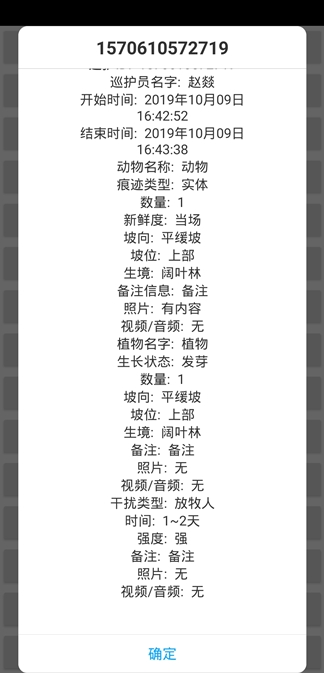
结果展示
带ScrollView,内容可滚动(滑动)浏览
Activity中添加自定义View的调用
新建Layout文件,给View写内容
p_dialog.xml1
2
3
4
5
6
7
8
9
10
11
| <?xml version="1.0" encoding="utf-8"?>
<LinearLayout xmlns:android="http://schemas.android.com/apk/res/android"
android:layout_width="fill_parent"
android:layout_height="fill_parent"
android:orientation="vertical">
<TextView
android:id="@+id/update_tv"
android:layout_width="fill_parent"
android:layout_height="fill_parent"/>
</LinearLayout>
|
在具体Activity中的调用
1
2
3
4
5
6
7
8
9
10
11
| private CustomDialog mDialog;
......
LayoutInflater factory=LayoutInflater.from(this);
View myView=factory.inflate(R.layout.p_dialog,null);
TextView myTv = myView.findViewById(R.id.update_tv);
myTv.setText("1asdfdasfdsafdsaafsdafadsfdsfasd\n2\n2\n2\n2\n2\n2\n2\n2\n2\n2\n2\n2\n2\n2\n2\n2\n2\n2\n2\n2\n2\n2\n2\n2\n2\n2\n2\n2\n2\n2\n2\n2\n2\n2\n2\n2\n2\n2\n2\n2\n2\n2\n2\n2\n2\n2\n2\n2\n2\n2\n2\n2\n2\n2\n2\n2\n2\n2\n2\n2\n2");
mDialog = new CustomDialog(this,myView);
mDialog.show();
......
|
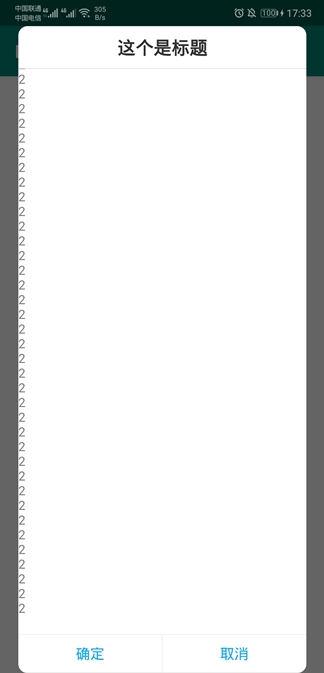
结果展示
带ScrollView,内容可滚动(滑动)浏览
参考博文
感谢Android之自定义弹窗Dialog 博文的参考提供,另外有不懂的大家也可以看一下这篇博文,也许有帮助